A KollmorgenUDFB"User Defined Function Block" UDFB can be used as a sub-function block in another program of the application. It is described using FBD, LD, ST or IL language. Input / output parameters of a UDFB (as well as private variables) are declared in the variable editor as local variables of the UDFB is a pre-defined function block created by Kollmorgen to simplify certain tasks or demonstrate a particular function. A Kollmorgen UDFB"User Defined Function Block" UDFB can be used as a sub-function block in another program of the application. It is described using FBD, LD, ST or IL language. Input / output parameters of a UDFB (as well as private variables) are declared in the variable editor as local variables of the UDFB must be instantiated and unlocked before it may be used.
| Name | Description |
| FB_AKDFltRpt | Outputs AKD fault information |
| FB_AxisPlsPosModulo | |
| FB_AxisPlsPosNoModulo | |
| FB_Cylinder | Control a cylinder and the Limit Switches. |
| FB_ElapseTime | Keeps track of the time that a Boolean input variable is on. |
| FB_FirstOrderDigitalFilter | Filter an Analog signal. |
| FB_PWDutyOutput | Converts an input range to a duty cycle percentage |
| FB_S700FltRpt | Outputs S700"Servostar 700 drive" See Servo Drive in Glossary drive fault Information |
| FB_ScaleInput | Scale DINT to LREAL |
| FB_ScaleOutput | Scale DINT to LREAL |
| FB_TemperaturePID | {rovides PID"Proportional-Integral-Derivative" A PID controller is a generic control-loop feedback mechanism widely used in industrial control systems. An "error" occurs when an event or a disturbance triggers off a change in the process variable. A PID controller attempts to correct the error between a measured process variable and a desired setpoint by calculating and then outputting a corrective action that can adjust the process accordingly temperature control with auto tuning |
| MCFB_AKDFault | Outputs AKD drive fault Information. |
| MCFB_AKDFaultLookup | String message of the corresponding AKD drive fault number |
| MCFB_GearedWebTension | Facilitates dancer and tension control in an electronic geared master/slave machine design |
| MCFB_Jog | Jog an axis in the selected direction at a defined speed |
| MCFB_StepAbsolute | Performs a static homing function by setting Actual Position to the position of an absolute encoder |
| MCFB_StepAbsSwitch | Performs a homing function by searching for an absolute positioned external physical switch |
| MCFB_StepAbsSwitchFastInput | Performs a homing function by searching for an absolute positioned external physical switch |
| MCFB_StepBlock | Performs homing against a physical object, mechanically blocking the movement |
| MCFB_StepLimitSwitch | Performs a single-axis home to a limit switch |
| MCFB_StepLimitSwitchFastInput | Performs a homing function by searching for an external physical switch |
| MCFB_StepRefPulse | Performs homing by searching for Zero pulseOutput once per turn from incremental encoders, used to zero the machine, Marker, or reference pulse in encoder |
| MLFB_HomeFindHomeFastInput | Performs a single-axis home to a limit switch connected to a High Speed Input |
| MLFB_HomeFindHomeFastInputModulo | Performs a single-axis home to a limit switch connected to a High Speed Input |
| MLFB_HomeFindHomeInput | Fast HomingThe Homing procedure allows, based on a position measurement, to set a position offset to the motor in order to ensure it is physically at the home position to a home switch |
| MLFB_HomeFindHomeInputThenZeroAngle | Fast Homing to a home switch + Zero angleMechanical zero angle of the feedback = 0 degree. |
| MLFB_HomeFindLimitFastInput | Homing to a limit switch |
| MLFB_HomeFindLimitFastInputModulo | Homing to a limit switch: Modulo mode |
| MLFB_HomeFindLimitInput | Homing to a limit switch |
| MLFB_HomeFindLimitInputThenZeroAngle | Homing to a limit switch + Zero angle |
| MLFB_HomeFindZeroAngle | Homing to a zero-angle reference |
| MLFB_HomeMoveUntilPosErrExceeded | Homing until the position error is exceeded |
| MLFB_HomeMoveUntilPosErrExceededThenZeroAngle | Homing until the position error is exceeded + Zero angle |
| MLFB_HomeUsingCurrentPosition | Homing using the current position |
| MLFB_Jog | Jog in a selected direction at a defined speed |
| MLFB_PlsPosFw | Forward position range indicator |
| MLFB_PlsPosFwBw | Forward/Backward position range indicator |
| MLFB_PlsTimeFw | Forward/Backward position/time range indicator |
| PipeNetwork_FFLD | Used to call the PNCode function block in FFLD POUs |
| ProfilesCode_FFLD | Used to call the ProfilesCode function block in FFLD POUs |
Table 11-53: List of System Kollmorgen UDFBs
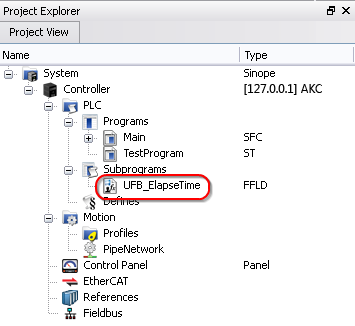
An instance of the UDFB has now been created in Subprograms.
You cannot create the instance of the UDFB directly from the dictionary or from the PLC Editor.
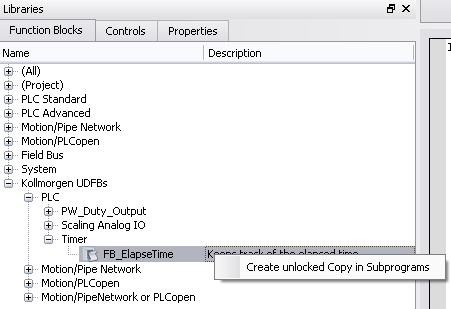
By default all Kollmorgen UDFBs are protected, meaning they may not be modified or renamed. When a Kollmorgen UDFB is dropped into an instance it is not editable. There are two solutions to make it editable:
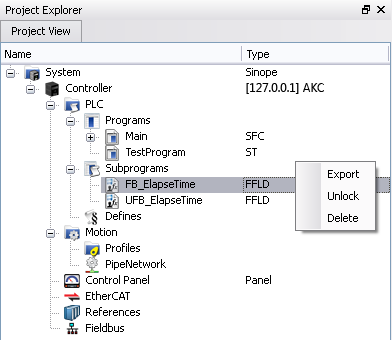
Once a Kollmorgen UDFB has been unlocked it may be renamed and exported by right-clicking on the UDFB. Renamed UDFBs must have unique names. Importing a saved UDFB will increment the UDFB's name.
In order for a UDFB to modify a structure or array based on the output, you must first define it as an input. The input is automatically set as an INOUT parameter. This is because OUTs are strictly simple types.
|
Stay Connected with Kollmorgen       
|
Copyright © 2015 Kollmorgen™ |

|